Unity Asset Store Black Friday Sale — Browse the sale (opens in a new tab)
Save System cover with a floppy disk and shield on a yellow background.

Save System for Unity

Save and load game data on every platform with one API.

Saves survive crashes and power cuts, recover from automatic backups, and can be checked and edited in a built-in Save Viewer.

Unity 2022.3 or later · Windows, macOS, Linux, Android, iOS, WebGL and UWP · No dependencies · Full C# source

See it working

The demo runs the Save Example scene that ships with the package. Change the coins, level, gems or potions and move the object, then press Save. Change them again and press Load to bring the saved values back.

Each of the three slots keeps its own save. In the browser demo, your save is still there after you reload the page.

Protect player progress

Saves survive crashes

Each save is written to a temporary file first and only then replaces the old one, so a crash or power cut mid-save never leaves a half-written file.

Damaged saves recover

The previous save is kept as a backup. If the main file is damaged, it is recovered from that backup automatically, and a missing or broken save never crashes your game.

Updates keep progress

Upgrade older save data when your save classes change, so updates never wipe progress. An older build never overwrites a save made by a newer one.

Crash-safe writes and backups apply to file storage, the default on desktop, mobile and WebGL. PlayerPrefs storage does not keep backups.

Inspect saves inside Unity

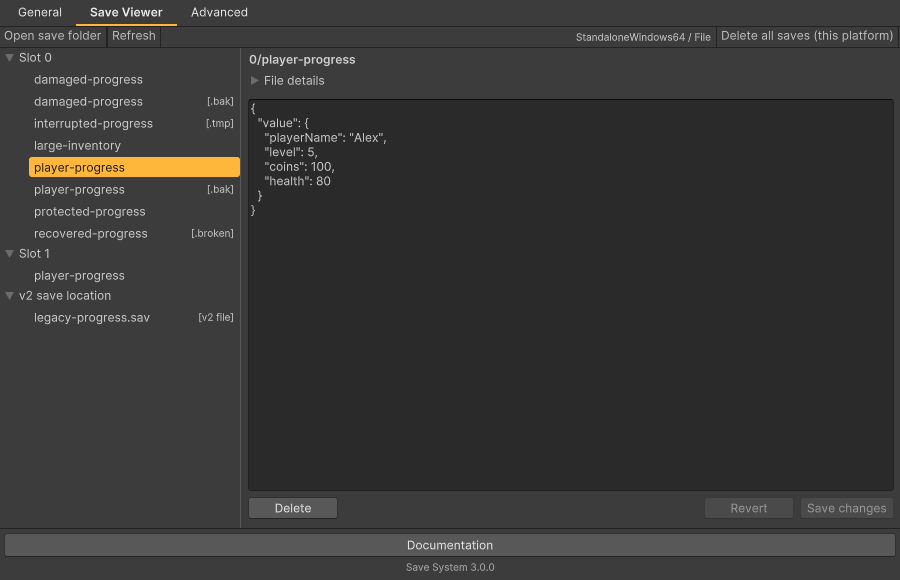
Save Viewer showing saves grouped by slot, companion files, the v2 save location and the selected save’s JSON.

The Save Viewer shows the saves your game made in the Editor, grouped by slot.

  • Read any save as formatted JSON, including encrypted ones.
  • Edit values and save them back, with the file’s encryption and compression kept.
  • Restore a backup when the main save can’t be read.
  • Delete saves one at a time or all at once for the current platform.

How the Save Viewer works

Build your saving workflow

Save your own data

Your own classes, lists and Unity types like Vector3 and Color. Switch to Newtonsoft for dictionaries, DateTime and inheritance.

Save slots

Separate profiles and playthroughs. Each slot can carry its last-played time and your own info for a save-select screen.

Sync or async

Call Save and Load directly, or await SaveAsync and LoadAsync. Each result tells you whether the save or load worked.

Encryption

AES-256 encryption with one setting, detection of edited save files, and key changes that don’t break existing saves.

Settings per platform

Choose the storage for each platform from one editor window, with checks that catch save problems before you ship.

Compression

Turn on compression for smaller save files.

Questions before buying

What data can I save?

Numbers, booleans, text, lists, arrays, Unity types like Vector3 and Color, and your own classes and structs marked [Serializable]. Choose Newtonsoft for dictionaries and DateTime. Unity object references such as sprites and prefabs aren’t saved: save an ID and look the object up after loading.

Does it include cloud saves?

Cloud saving isn’t built in. Use SaveToString to get text for your own cloud service and LoadFromString to read it back, or connect your service as a custom storage through ISaveStorage.

Does encryption stop cheating?

It stops casual editing and detects changed files, but the key ships inside your game and a determined player can extract it. Don’t rely on it to protect online leaderboards or purchases.

Which platforms are supported?

Windows, macOS, Linux, Android, iOS, WebGL and UWP. Consoles aren’t officially supported; they use PlayerPrefs by default, and you can connect a console’s own save system through ISaveStorage.

I use All Platforms Save. Will my players lose their saves?

No. Your existing v2 code keeps working and can read v2 saves while you switch over, and the settings window can carry over your v2 platform and serializer settings. Reading old v2 binary saves isn’t available in WebGL builds. See the upgrade guide.

More questions in the FAQ